

Introduction
The Dexter Industries Thermal Infrared Sensor reads surface temperatures of objects. It is a non-contact thermometer based on the MLX90614. Detecting the infrared radiation from an object, the sensor can read object temperatures between -90°F and 700°F (-70°C and +380°C). The sensor has a high accuracy of 0.5°C and a resolution of 0.02°C.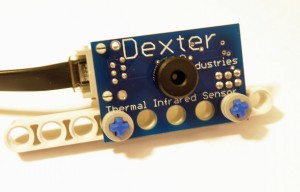
The Thermal Infrared Sensor reads both the ambient temperature (the temperature of the air around the sensor) and the surface temperature of the object that the sensor is pointed towards.
Hardware
The Thermal Infrared Sensor can be connected to any of the four sensor ports on the Mindstorms NXT. The sensor uses I2C protocol to communicate with the Mindstorms NXT.
Layout
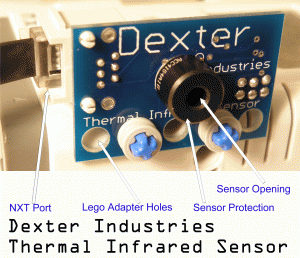
On the frontside of the sensor:
- Sensor Opening: The infrared detector lies inside this opening. This is the actual sensor that reads the temperature. The lens is surrounded by a black protection cylinder to prevent damage to the active parts of the sensor. Care should be taken not to stick anything in the hole of the sensor or scratch the lens.
- Sensor Protection: This black metal band protects the sensor opening.
- LEGO Adapter Holes: Mount the Thermal Infrared sensor to your LEGO contrfaption using these holes.
- NXT Port: Connect to the NXT here. The TIR sensor can be placed on any of the four sensor ports of the NXT.
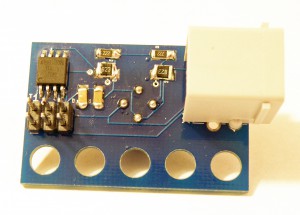
On the backside of the sensor:
- Microcontroller: For more advanced users, this chip converts data from the Thermal Infrared Sensor into I2C data for the NXT.
- ISP Connector: For more advanced users, you can re-write the firmware for the Thermal Infrared Sensor here with an AVR adapter such as the AVRISP mkII.
- Resistors and Capacitors: Various resistors and capacitors that help make the sensor work smoothly.
Hints and Warnings
- The sensor can be mounted to your contraption using the NXT cross-style pegs.
- When measuring temperatures greater than room temperature, be sure to hold the sensor at a sufficiently safe distance from the heat source. For example, holding the sensor within 1-2 cm of a hot source is fine, but touching the sensor with the hot source may damage the sensor.
- The microcontrollers, capacitors, and resistors are robust. It is fine to touch these items. Water and excessive moisture will damage these items.
Software
Overview
The Thermal Infrared Sensor communicates with the LEGO Mindstorms through any sensor port on the NXT. The detector on the front of the sensor board is controlled by a microcontroller (on the back of the sensor board). The microcontroller translates signals from the detector to the Mindstorms NXT.
For most program, the Thermal Infrared Sensor NXT-G Block will be sufficient.
NXT-G
NXT-G blocks have been developed for the Thermal Infrared Sensor. These blocks read object temperature and the ambient temperature. They can be downloaded here:
Thermal Infrared Sensor NXT-G Block: The NXT-G Block has two outputs. One reads an object’s temperature and one reads the ambient temperature. Temperatures are output in 100XKelvin.

The Sensor Icon in NXT-G

The Sensor Block in NXT-G

The Thermal Infrared Sensor NXT-G Control Panel
Thermal Infrared Emissivity NXT-G Block: Most objects and materials you will want to measure the temperature of will not need the emissivity adjusted. The sensor has a default emissivity of 1.0, representing a black body. However, some materials (especially polished metals and reflective materials) will need the emissivity adjusted to measure temperature accurately. This block can be used to changewrite the emissivity of the object being read. Emissivity is typically expressed as a fraction, were 1.0 is a perfect black body. To set the emissivity to 1.0, the number into the block should be 10,000. To set the emissivity to Aluminum aluminum foil (ε = 0.04), for example, the number into the block should be 400.
If the emissivity value is set to a new value, it will remain set to that value until the emissivity is reprogrammed.
The emissivity of common materials can be found here.
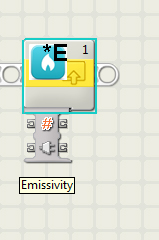
Emissivity Block
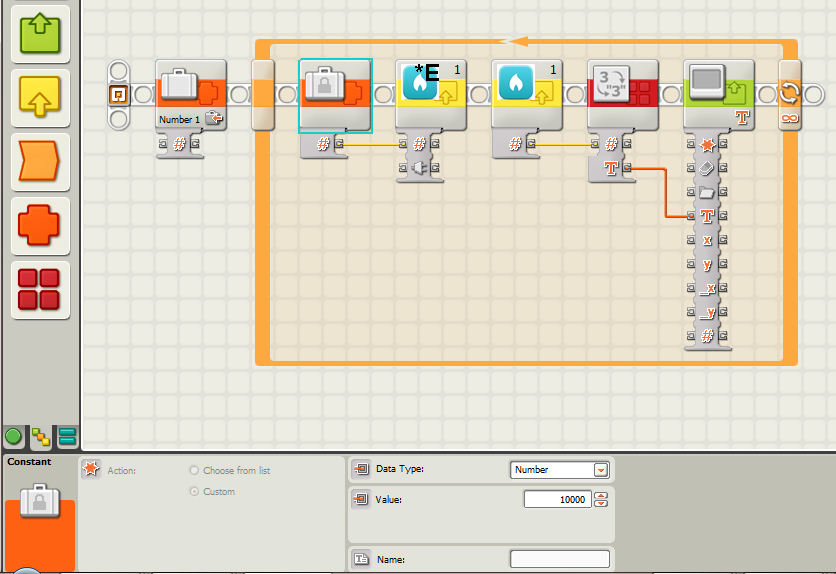
A quick program in NXT-G for setting the emissivity.
Sensor Firmware
Advanced users that want to develop firmware are able to do so. This information is provided to advanced users, but is by no means necessary to understand to fully use the thermal infrared sensor.
The firmware for the TIR sensor was written in Atmel’s AVR Studio 5.0. The firmware polls the SMBus protocol of the MLX90614 and translates it into standard I2C for the Mindstorms NXT. The I2C slave address of the sensor is 0x0E (in hex format). The TIR has two registers it updates with temperature information:
- 0x00 – This register stores the Ambient Temperature read by the sensor.
- 0x01 – This register stores the Object Temperature read by the sensor.
- 0x02 – Write the emissivity, in two bytes, to this register.
- 0x03 – This register stores the current emissivity value.
When the LEGO MINDSTORM NXT requests a register, the Infrared sensor returns two bytes: a High Byte and a Low Byte. The High and Low Bytes. When these are shifted and combined into a single floating point number and then multiplied by the Temperature Factor (0.02), this gives the temperature, in Kelvin, multiplied by 100 (divide by 100 to get an accurate floating point value). See the examples below for more information.
RobotC
An example in RobotC. This example reads the object temperature, ambient temperature, and emissivity, and writes the emissivity. The RobotC example for LEGO MINDSTORMS NXT can be found here.